|
Table of Contents : |
How do I add a new work status?
| 1. | Login to your account using the username and password provided. | |
| 2. | Hover over Asset Management Centre and Click on Monthly Reporting tab. |  |
| 3. | Go to Manage By field and Select Manage By Asset from List. | 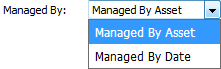 |
| 4. | Hover on the Controls button and Click on Manage Work Status List option. It will open new window of Manage Work Status List. | 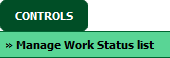 |
| 5. | Click on ADD button. |  |
| 6. | Select Client and Document Type. |  |
| 7. | Add Status Title and Other relevant details. |  |
| 8. | Then click on SAVE button to add a new Column. |  |
| 1. | Login to your account using the username and password provided. | |
| 2. | Hover over Asset Management Centre and Click on Monthly Reporting tab. | |
| 3. | Go to Manage By field and Select Manage By Asset from List. | |
| 4. | Hover on the Controls button and Click on Manage Work Status List option. It will open new window of Manage Work Status List. | |
| 5. | Select Work Status from the grid which you want to edit. |  |
| 6. | Click on EDIT button. |  |
| 7. | Select Client and Document Type. | |
| 8. | Edit Status Title and Other relevant details. | |
| 9. | Click on SAVE button to save your changes. | |
How do I delete a work status?
| 1. | Login to your account using the username and password provided. | |
| 2. | Hover over Asset Management Centre and Click on Monthly Reporting tab. | |
| 3. | Go to Manage By field and Select Manage By Asset from List. | |
| 4. | Hover on the Controls button and Click on Manage Work Status List option. It will open new window of Manage Work Status List. | |
| 5. | Select Work Status from the grid which you want to delete. | |
| 6. | Click on DELETE button. |  |
| 7. | It will open one Pop up. Click on OK button. | 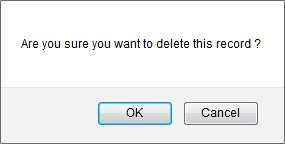 |
How do I reorder work status row?
| 1. | Login to your account using the username and password provided. | |
| 2. | Hover over Asset Management Centre and Click on Monthly Reporting tab. | |
| 3. | Go to Manage By field and Select Manage By Asset from List. | |
| 4. | Hover on the Controls button and Click on Manage Work Status List option. It will open new window of Manage Work Status List. | |
| 5. | Select Work Status from the grid. | |
| 6. | Click on move Icon to move your row upward/downward. |  |
| Note:- If you do not see this option appear it is due to access restrictions for your user account. please contact an administrator. |
Lauren Partridge
Comments