Login to your account using the username and password provided.
| Table of Contents : |
How do I access Asset History?
| 1 |
Login to your account using the username and password provided. |
|
| 2 |
Hover over the Fleet Management tab and Click on Aircaft Centre Tab. |
 |
| 3 |
Select the record for which you want to assign Asset History. |
 |
| 4 |
Click on the ASSET HISTORY button. It will open a new window. |
 |
How do I add an asset history period / Operator?
| 1 |
Login to your account using the username and password provided. |
|
| 2 |
Hover over the Fleet Management tab and Click on aircraft Centre Tab. |
 |
| 3 |
Select the record for which you want to assign Asset History. |
|
| 4 |
Click on the ASSET HISTORY button. It will open a new window. |
 |
| 5 |
Once the Asset History page is open. Click on ADD button to add the asset history period. |
 |
| 6 |
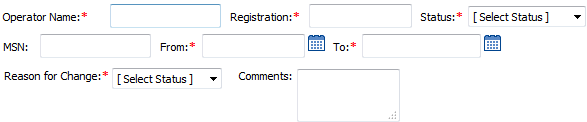
Enter Operator Name, Registration and Select Status from the list. |
 |
| 7 |
Enter MSN, From Date and To Date. |
 |
| 8 |
Select Reason for Change from the list and Enter your Comment. |
 |
| 9 |
Click on the SAVE button to update any changes made. |
 |
How do I edit an asset history period / Operator?
| 1 |
Login to your account using the username and password provided. |
|
| 2 |
Hover over the Fleet Management tab and Click on aircraft Centre Tab |
 |
| 3 |
Select the record for which you want to assign Asset History. |
|
| 4 |
Click on the ASSET HISTORY button. It will open a new window |
|
| 5 |
Once the Asset History page is open. Click the asset from the grid. |
|
| 6 |
Click on the EDIT button to edit the asset history period. |
 |
| 7 |
Modify any of the required fields that you want to edit. |
 |
| 8 |
Click on the SAVE button to update any changes made. |
|
How do I delete an asset history period / Operator?
| 1 |
Login to your account using the username and password provided. |
|
| 2 |
Hover over the Fleet Management tab and Click on aircraft Centre Tab. |
 |
| 3 |
Select the record for which you want to assign Asset History. |
|
| 4 |
Click on the ASSET HISTORY button. It will open a new window. |
|
| 5 |
Once the Asset History page is open. Click the asset from the grid. |
|
| 6 |
Click on the DELETE button. Note: For in Use operator delete button will be in disable mode for a normal user. |
 |
Shwetha Umesh
Comments