|
Table of Content : |
How do I set Default MCC View for the Client?
| 1. | Login to your account using the username and password provided. |
|
| 2. | Hover over the Clients Tab and click on Main Client Info. |  |
| 3. | Select client from the grid available on the Page. |  |
| 4. | Click on EDIT Button to make required changes. |  |
| 5. | Check the available option of Default MCC View | Default MCC View |
| 6. | Click on the respective section to make it as a default tab for the selected client. | 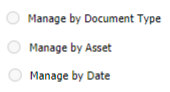 |
| 7. | After selection, click on the SAVE Button to save your changes. |  |
| Note: - If you do not see this option appear it is due to access restrictions for your user account. please contact an administrator. | ||
Riyaz Mirza
Comments